
A lot of what coding agents build has no server. A Vite + React dashboard that reads a CSV, a page of documentation for a team, a small tool that talks to an API from the browser. Until today, deploying one of those to AgentCell meant a Dockerfile that wrapped a web server around a folder of files, and a whole microVM to run it.
As of 25 September 2026, agentcell deploy doesn’t need the Dockerfile for these. Give it a folder of HTML, or a frontend project with a build script, and it builds the site on the platform and serves it. No microVM runs for it at all. This post covers what you can deploy, what happens when you do, and what isn’t there yet.
What deploy accepts now
deploy reads the root of the directory and takes the first of three shapes that matches:
| The root holds | What you get |
|---|---|
a Dockerfile | A container cell, exactly as before: the port from its EXPOSE (8080 when there’s none) and /data for anything that must survive a restart. |
a package.json with a build script | A static site, built on the platform. npm ci when there’s a package-lock.json, otherwise npm install, then npm run build. The first of dist/, build/ or out/ that holds an index.html is what gets served. |
an index.html | A static site, served as it is, with no build. |
The middle row covers Vite, Create React App, Vue, Svelte, Astro, and Next.js with output: 'export'. The order matters: a directory with a Dockerfile is still a container, even if it also has a package.json.
agentcell deploy --cell team-dashboard .    # prints https://team-dashboard.agentcell.cloud
agentcell logs --build team-dashboard       # the npm output, if the build fails
Use client 0.1.4, released today, for frontend projects. It leaves node_modules and the frontend build caches out of the upload, since the platform runs the install itself. An older client uploads node_modules, and a typical frontend project then goes over the upload limit.
Why no microVM runs for it
Every container cell is a Kata microVM with its own guest kernel. That’s the right boundary for code we didn’t write, and it costs about 380 MiB of real memory per cell. Container cells don’t sleep yet, so that memory is spent whether anyone is using the app or not.
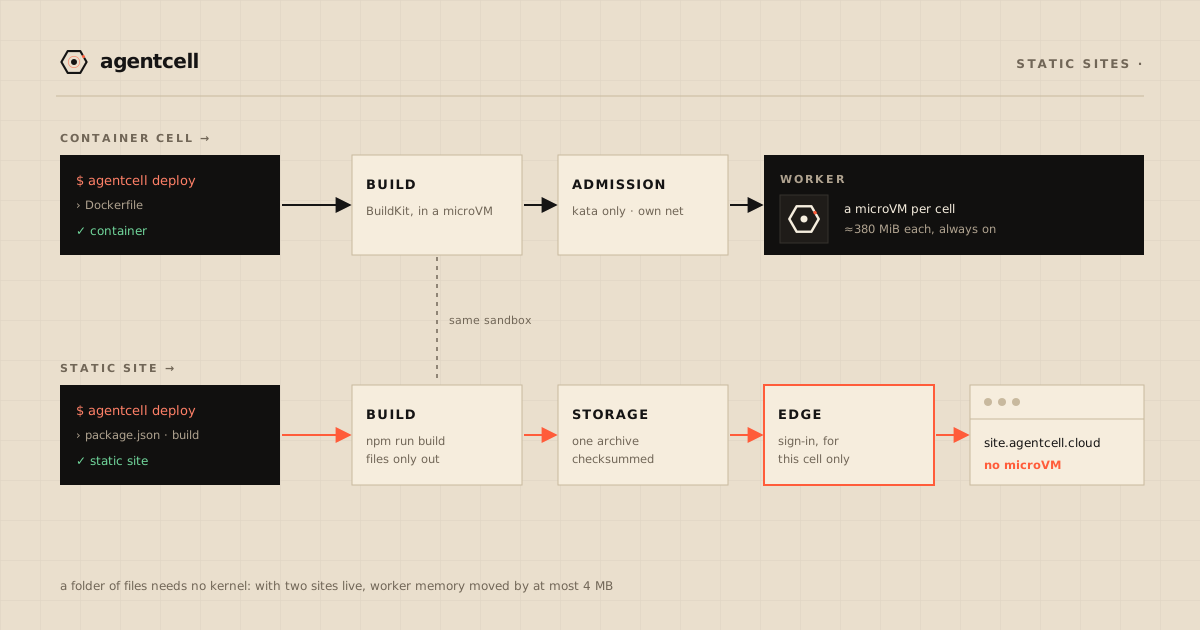
A folder of files needs none of it. There’s no process to isolate and nothing to keep warm. So a static site never reaches the scheduler: the platform’s edge serves its files from object storage. With two static sites live, free memory on the workers moved by at most 4 MB.
It’s also a smaller attack surface. Once it’s built, a static site runs no code of yours anywhere on our machines. The build does run your code, since npm run build is a script you wrote, and it runs where every build runs.
What happens when you deploy one
Detection. The control plane unpacks the upload and applies the three rules above, in order. A directory that matches none of them is refused, and the error names all three shapes.
The build. A frontend goes through the same build job as a container, on the same build machines, inside the same kind of sandboxed microVM. The project has no Dockerfile, so the control plane supplies one: install, npm run build, then a final stage that keeps only the chosen output folder. Your npm install gets no more privilege than anyone’s Dockerfile does. The result is an image that holds files and no program. A plain index.html site skips this step.
Publishing. The platform pulls the built image, checks that it carries this deploy’s marker, and takes out the files. Anything whose name starts with a dot is left out, except .well-known/, so a stray .env in the folder is never served. The files go into object storage as one archive, which is read back and checked against its checksum before the cell’s name is pointed at it. The site also gets its own Cloudflare Access application, like every cell.
Serving. A request goes through Cloudflare Access and the tunnel to the edge router, the same path as any cell. The router verifies the sign-in, then serves the file from a local copy of the archive, fetched from storage and checked against the checksum before it’s used.
How paths resolve
The rules follow the usual static-host conventions:
/aboutredirects (308) to/about/whenabout/index.htmlexists. Otherwiseabout.htmlis served.- With no
404.html, an unknown path with no file extension getsindex.html. That’s what a single-page app with client-side routes needs:/reports/marchsurvives a reload. With a404.html, that page is served with status 404 instead. - Hashed files under
assets/, the names a bundler like Vite writes, are cached by browsers as immutable. A redeploy produces new names, so it is picked up on the next load. - An
"agentcell"key inpackage.json, such as{"output": "public", "spa": false}, overrides the output folder and the single-page fallback.
Two sample apps show all of this: static-plain, a folder of HTML with a 404.html and a committed .env canary that must never be served, and vite-react, a single-page app with a client-side route.
Same front door, one more check
A static site gets the same private https://<cell>.agentcell.cloud address and the same sign-in as a container cell. The edge router checks the signed identity assertion the same way: signature, pinned algorithm, issuer, expiry.
A valid signature proves the assertion came from our Access account, though, not which cell it was issued for. So for static sites the router also checks that the assertion was issued for that specific cell’s Access application. We tested it live: another organisation’s genuine sign-in, sent to a static site, is refused with a 403 and none of the site’s bytes.
Web cells don’t have this check yet. For them, each cell’s own Access application is the only per-cell binding for now. The isolation post has the details.
Everything in a static site is readable by anyone who can open it. That’s true on any host, but worth saying: an API key in a frontend bundle is a published API key.
What the rollout caught
We turned static sites on one switch at a time. The first live smoke test failed 7 of its 88 checks, because Cloudflare was rewriting HTML in flight (email obfuscation) and dropping our ETag. Every static response now carries Cache-Control: no-transform, and the rerun passed 90 of 90. Breaking it on purpose has the longer version.
What isn’t there yet
- Servers still need a Dockerfile. FastAPI, Flask, Streamlit, Express, and Next.js in server mode aren’t detected without one. A coding agent writes one in a few seconds, and the samples include several to copy.
- Container cells don’t sleep. Scale-to-zero is designed, not shipped. Static sites sidestep it by having no machine of their own.
- No public sites. Every cell, static or not, is behind sign-in. There’s no sign-in-free option yet.
- No custom domains, and no
envorsecretsverbs, so a build can’t be handed values from outside its source. - Rollback is ours, not yours, for now. We can roll a static site back to an earlier version from the operator side. The public
rollbackverb hasn’t shipped. - At most 10 static sites per organisation, for now.
We’ll say so here when these change.
For the full deploy path, container and static, read what happens when you run agentcell deploy. Or put a folder online: deploy now.