
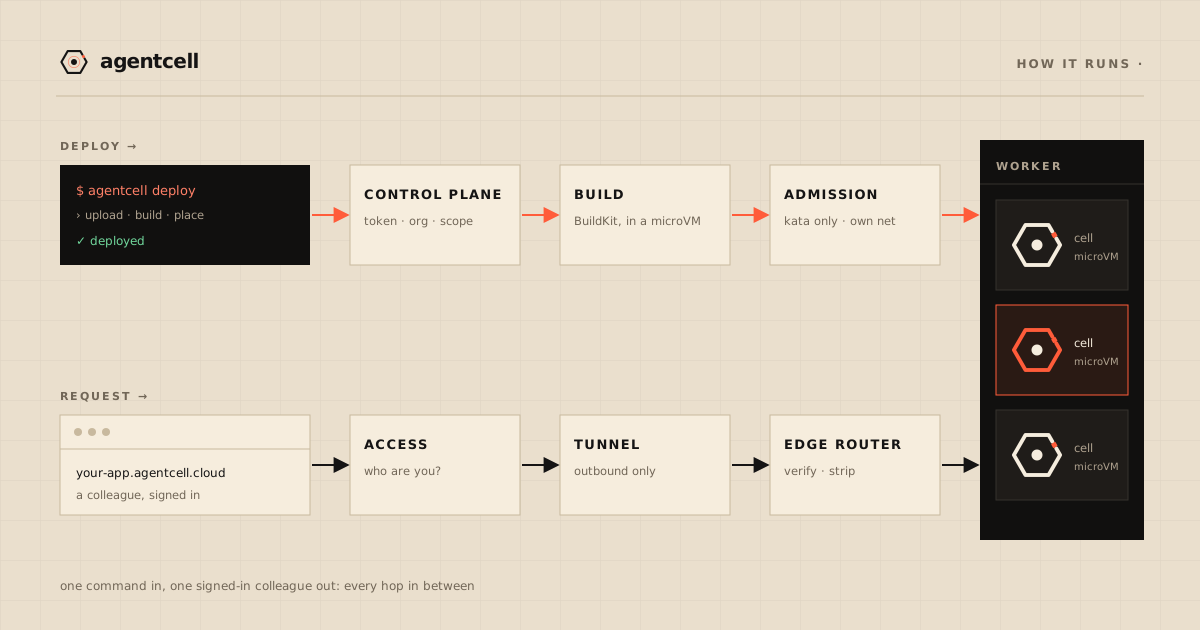
You type one command in a directory that has a Dockerfile, or a frontend project, or just an index.html. A few minutes later a colleague opens a URL, signs in with the account they already have, and uses the app. This post walks through what happens in between, for a container and for a static site. It also serves as the map for the other two posts in the series, which go deeper on isolation and reliability.
Everything described here runs today. Where we’ve designed something but haven’t built it, we say so, and those items are collected at the end.
The rule underneath everything
Our infrastructure repository starts with one rule:
A service may never address another service by
localhost, by LAN IP, or through a shared filesystem.
Services find each other by name, over an encrypted overlay network (Tailscale), through service discovery (Consul). CI has a lint check that searches for loopback addresses and hard-coded private IPs and fails the build when it finds one.
The point is that no machine is special. If nothing depends on where a service happens to run, moving it comes down to a DNS record and a firewall rule, and rebuilding a machine from scratch is routine. The reliability post shows what that gets us when a machine is switched off mid-request.
The machines
The platform is split across separate machines, each with one job:
- Control plane: the API, the scheduler’s servers, service discovery and the admission proxy.
- Build machines, which turn source into images and never run customer apps.
- Registry and storage, for built images, uploaded source and published static sites.
- Edge, the only machine that talks to Cloudflare and the only way in for a request from outside. It also serves static sites itself.
- Workers, a pool of machines that run cells and nothing else.
The workers sit on their own network segment, where forwarding is deny-by-default. A cell can move from one worker to another, and its data moves with it. All of these machines are created by Terraform and configured by Ansible from the same repository, so any worker can stand in for any other.
1. The client knows two things
agentcell is a single static Go binary, built only from the standard library. It’s both the CLI and an MCP server, so a coding agent deploys with the same code a person uses.
All it knows about the platform is a base URL and a token. The token comes from agentcell login, which signs you in through a browser on any device, including a phone, and lives in a file under your user’s config directory, or can be read from an environment variable. The client never prints it and won’t accept it as a command-line argument, since that would put it in your shell history.
You don’t need Docker installed. The client packs up the source directory and uploads it. Since version 0.1.4 it leaves node_modules and frontend build caches behind, because the platform runs the install itself.
2. The control plane decides
The upload goes to api.agentcell.cloud, through Cloudflare, to the control plane. That’s a small HTTP service written against Python’s standard library, with its state in Postgres (Neon).
Before doing any work it runs four checks, in order. The first is who’s asking: the token is checked against a salted scrypt hash, and we don’t store tokens in any form that could be read back. Then which org the token belongs to. Every operation is scoped to that org, and if you ask about another org’s app you get a “not found” that is byte-for-byte identical to the one for an app that doesn’t exist. Then whether the token’s scope allows the operation. Last is the rate limit, which is applied after authentication so that a stranger can’t use up a customer’s allowance.
Then it looks at the root of the upload and picks the first of three shapes that matches. A Dockerfile means a container, which is built in step 3 and placed in step 5. A package.json with a build script means a frontend to build into a static site. A bare index.html means a static site with nothing to build. Anything else is refused, and the error names all three.
Each deploy carries an idempotency key derived from the hash of the source. Submit the same bytes twice and the second response is unchanged, pointing at the same deployment. In our test the first submission took 76 seconds and the second took 3.4. Agents retry, and we don’t want a retry to start a second build.
3. The build runs in a sandbox too
The source goes into object storage, and a build job is scheduled onto a dedicated build machine. BuildKit builds the image inside a Kata microVM on that machine; the build itself doesn’t run on the host.
Building an image needs more privilege than running one. That extra privilege exists only on the build machines, which never run customer apps, and if the same build task is forced onto a machine that runs apps, it’s refused.
Your Dockerfile doesn’t need to know anything about us. The platform reads the port from the last EXPOSE in the final stage, or uses 8080 and tells you it did. It stamps a marker file into the image and, before deploying, reads that marker back out of the pushed image, so we can prove the image that runs is the one that was built. The image goes to our private registry, which refuses anonymous pushes and pulls. Each worker pulls with its own read-only credential.
Builds queue, one at a time per build machine. A build that’s waiting is reported as queued, so it doesn’t look stuck.
A frontend goes through exactly the same build. It has no Dockerfile (detection just established that), so the control plane supplies one: npm ci when there’s a lockfile, npm install when there isn’t, then npm run build, then a final stage that keeps only the first of dist/, build/ or out/ holding an index.html. Your npm install runs on the same build machines, inside the same kind of sandboxed microVM, as anyone’s Dockerfile. What comes out is an image with no program in it, only files.
4. A static site stops here
A static site never reaches the scheduler. The platform pulls the built image, checks its marker the same way, and takes out the files. A plain index.html site skips the build and is published straight from the upload. Files and folders whose names start with a dot are left out, except .well-known/, so a stray .env is never served.
The files are packed into one archive in object storage, read back and checked against their checksum, and the cell’s name is pointed at that archive. The site gets its own Cloudflare Access application, like every cell. There’s no job, no microVM, no network and no /data. With two static sites live, free memory on the workers moved by at most 4 MB; a container cell costs about 380 MiB.
5. Placement: one template, one door
Every app (we call them cells) is rendered from a single job template. Nobody hand-writes a job for a customer or creates a volume by hand, and if we ever find we need to, we’ll treat that as a bug.
The rendered job goes to Nomad, our scheduler, and the only way to get it there is through an admission proxy. The proxy refuses any job that doesn’t run under the Kata runtime or doesn’t join the cell’s own private network, and it does that before Nomad sees the job. Nomad’s API is firewalled from everywhere else, so someone holding a valid credential who skips our client and talks to the scheduler directly still goes through the same checks. What the proxy refuses, and why, is in the isolation post.
Nomad places the cell on a worker, where it starts as a Kata Containers microVM: a lightweight virtual machine with its own guest kernel. Your code only ever runs inside one of these, not in a shared-kernel container.
Each cell gets its own network, a bridge that no other cell is attached to. From inside it, a cell can’t reach its neighbours or any platform service, including the scheduler, service discovery, the registry and storage.
It also gets a /data volume that survives restarts and redeploys. restic backs it up off the machine to Cloudflare R2 every five minutes and again when the cell stops, and it’s restored when the cell starts somewhere else. Moving a cell between workers is, in effect, a restore.
And there’s a health check on /. After three failures in a row, Nomad restarts the cell.
agentcell deploy --schedule gives you a scheduled cell instead. That’s a cron job with no URL that runs to completion, with overlapping runs prohibited. The admission proxy has its own list of refusals for jobs of that shape.
6. The request path
A request from your colleague’s browser takes this path:
browser
  → Cloudflare edge          TLS, and Cloudflare Access: who are you?
  → Cloudflare Tunnel        outbound-only from our side; no open inbound port
  → edge router              re-verifies the signed identity; strips credentials
  → the cell's microVM       found by name in service discovery
There are no inbound ports. Our edge machine dials out to Cloudflare and requests come back over that connection, so we have no public IP address serving traffic and no open inbound port for anyone to scan.
Sign-in happens before your code runs. Each cell has its own Cloudflare Access application listing the people it’s shared with, and a stranger gets a login page or a 403 without ever reaching your app. Your app doesn’t implement any authentication itself.
We don’t take the edge’s word for it, either. The edge router re-verifies the signed identity assertion on its own: it checks the signature against Access’s published keys, pins the algorithm, and checks issuer and expiry. Then it removes cookies, Authorization and the assertion before the request reaches the cell, so a cell never holds a credential it could replay somewhere else.
A hostname that doesn’t exist gets the same answer as one that does, so nobody can enumerate cell names.
For a static site the last hop is the edge router itself. After the same verification, it checks one more thing: that the sign-in token was issued for this particular cell. Then it serves the files from a local copy of the archive, fetched from storage and checked against the checksum. Unknown paths with no file extension get index.html, so a single-page app’s routes survive a reload, unless the site ships a 404.html. The isolation post covers that per-cell check, including where it doesn’t apply yet.
Why we test over the real route
Our end-to-end harness runs every deploy path over the public route as well as the private network. Before our first client release, it caught a pre-release build stalling on upload over the public route, although every test over the private network had passed.
A goroutine dump showed the client parked, waiting for the server to say “go ahead”. The client had started sending Expect: 100-continue so that a refusal would arrive before a large upload. Over HTTP/2, Go strips that header but still holds back the body. Cloudflare waited 15 seconds for a body that never came and reset the stream. Go treats a reset before any body has been sent as safe to retry, so it retried, every 15 seconds, indefinitely.
The fix was to send the header only when talking to the private network directly, and a test now fails if the client ever sends it over HTTPS. The fixed build then passed the full harness over the public route, and that is the build we released. Each component was correct on its own; the issue lived only at the boundary between them, which is exactly what the harness is there to exercise.
What’s coming next
A few things you might expect aren’t there yet:
- Container cells don’t scale to zero. They don’t sleep today, so an idle container cell keeps its memory. It’s designed and on the roadmap. A static site has no memory to keep.
- A Python or Node server with no Dockerfile isn’t detected. Static sites are; servers need a Dockerfile for now.
- There’s no
agentcell secretsyet. Please don’t work around that by putting credentials in your source. - Outbound traffic has no allowlist. Cells can’t reach each other or the platform, but they can reach the public internet. Per-cell allowlists are designed but not enforced yet.
- Spend caps and per-cell access logs are both designed, and neither is built.
- AgentCell runs in a single region today, with one control plane. If that region has an outage we’re down, with no failover. Backups are stored off-site, so an outage wouldn’t mean data loss.
Each of these has a written design with its own test for “done”. We’ll say so here when one ships.
The rest of the series: where one tenant ends and breaking it on purpose. Static sites have their own post. Or skip to the part where it works: deploy now.